

About this app
Canon Print Service is an Android printing utility enabling wireless printing to Canon printers from compatible applications. It helps users easily print documents and photos directly from their mobile devices.
Key features
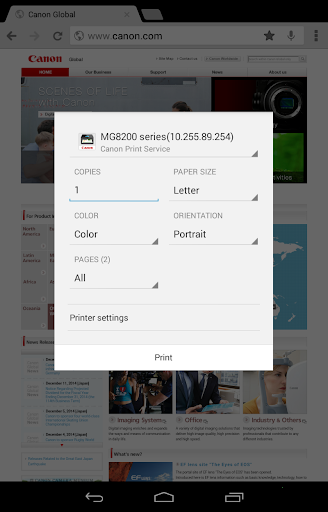
Print Settings Control
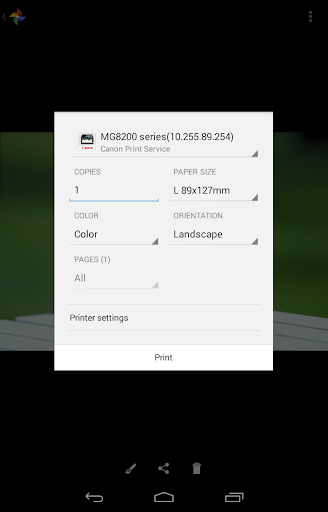
Adjust print quality, color, paper type, and layout options like 2-sided or 2-on-1 printing for tailored output directly from your mobile device.
Secure and Department Printing
Utilize secure printing features and Department ID management for enhanced control and security when printing sensitive documents in shared environments.
Direct PDF Printing
Print PDF files directly without needing to open them in another application, streamlining the printing process for common document types.
How it works
- Ensure your Canon printer is connected to the same network as your Android device.
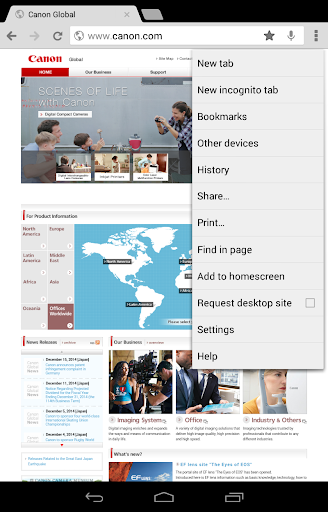
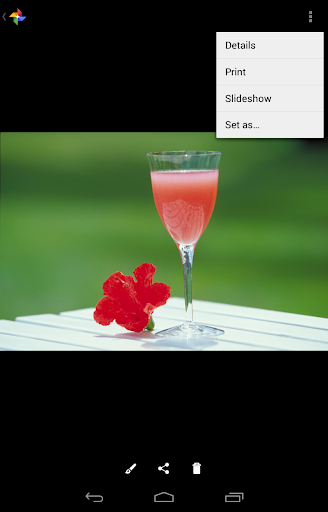
- Open the document or photo you wish to print within a compatible application.
- Select the 'Print' option and choose 'Canon Print Service' to configure and send your print job.
Who it is for
- Android users with compatible Canon printers.
- Individuals needing to print documents wirelessly from their smartphones.
- Users requiring basic print settings adjustments like color or paper type.
- Office environments utilizing Canon printers for secure printing needs.
Important information
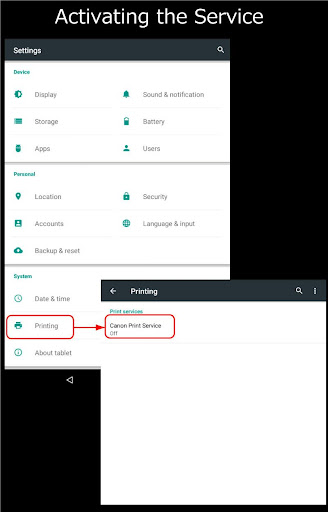
- For Android 6 and earlier, the Canon Print Service requires manual activation after installation via device settings.
- Functionality and available print settings may vary depending on the specific Canon printer model used.
- Users may be prompted to grant notification permissions for optimal app performance.
Overall assessment
Canon Print Service offers convenient wireless printing for compatible Canon devices from Android. Its core strengths lie in straightforward setup and essential print controls, making it suitable for users needing to print directly from mobile applications.