








About this app
RAR is a versatile Android utility that functions as a compression tool, archiver, extractor, and file manager, simplifying file management and storage.
Key features
Archive Creation
Compress files into RAR or ZIP formats to save space or bundle items. This is useful for efficiently storing or sharing multiple files together.
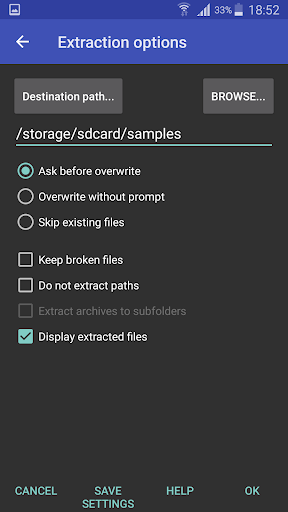
File Extraction
Unpack various archive formats like RAR, ZIP, and TAR. Users can easily access contents from compressed files received or downloaded.
Basic File Management
Perform essential file operations such as copying, deleting, and moving files and folders. This helps organize your device's storage.
How it works
- Open the RAR app to browse your device's files and folders.
- Select files or folders you wish to compress or extract.
- Tap the appropriate icon to perform the chosen archive or file management task.
Who it is for
- Users needing to reduce file sizes for storage or transfer.
- Individuals who receive files in compressed formats.
- People managing numerous files and folders on their Android device.
- Those looking for a simple tool to handle archives.
Important information
- The app supports creating RAR and ZIP archives.
- It can unpack a wide range of archive formats, including password-protected ones.
- Basic file management operations are included for on-device organization.
Overall assessment
RAR is a capable and free utility for Android, offering essential compression, extraction, and file management features. It suits users needing to handle archives efficiently on their mobile devices.